
The genius song website, the home of The Genius Song, is not a one-click shop. You start on a home page that sells a different audio, find the right sales page, sit through part of a long video or skip to a text version, then leave for a ClickBank checkout. None of it is hard once you know the path. This walkthrough covers each step in order, what you will see on screen and what to check before moving on.
We followed the path on October 9, 2026, up to the payment page. We did not buy, so anything after payment comes from the seller’s own descriptions.
Follow Along on the Seller’s Site
Our link opens step 1, the seller’s home page. Checkout is ClickBank: $39 once, 90 days to request a refund.
Visit the Official Website
Payment handled by ClickBankTable of Contents
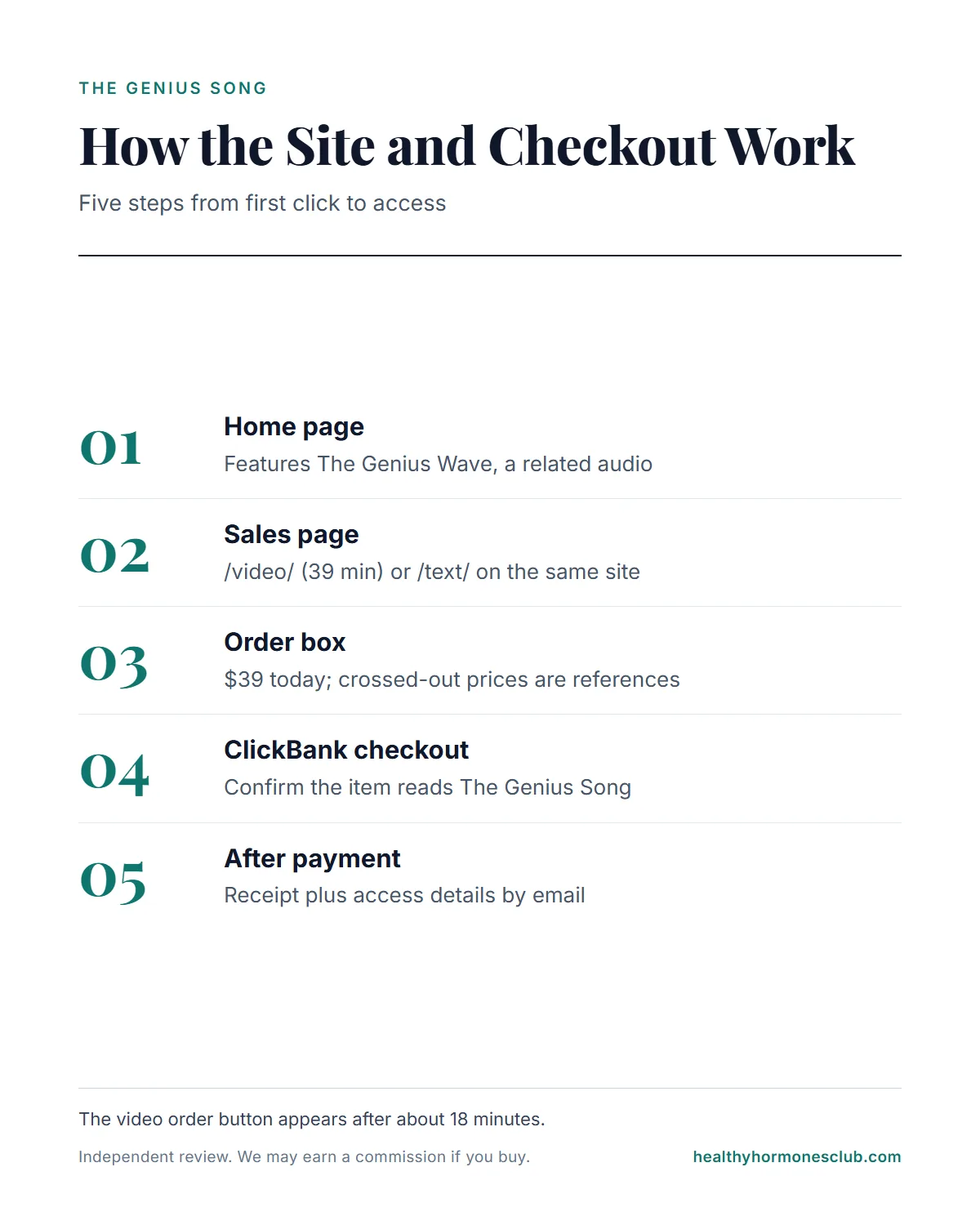
The Path in One Table
| Step | Where | What to check |
|---|---|---|
| 1. Home page | geniussongoriginal.com | It features the related audio, a related product |
| 2. Sales page | /video/ or /text/ | This is The Genius Song pitch |
| 3. Order box | Below the video or text | $39 today; crossed-out prices are references |
| 4. Checkout | geniusbr.pay.clickbank.net | Item name, digital, not recurring, local total |
| 5. After payment | Your email inbox | Receipt plus access details |
Step 1: The Home Page
Links to the seller, including ours, open the home page. When we checked, it was titled “12-Minute Audio Session” and sold a 12-minute theta audio, with a “Buy Genius Wave Now” button that leads to a different ClickBank item.
So the key fact for this step: the official site’s home page currently features the seller’s related audio, The Genius Wave; The Genius Song presentation is on the same site’s /video/ page. If The Genius Song is what you came for, do not use the Genius Wave button. We could not test whether US visitors see a different home page.
Step 2: The Sales Page
The Genius Song has two versions of its sales page on the same site:
- /video/ (the browser tab says “The Gamma Song”): a 39-minute video. The order button is coded to appear after 1,104 seconds, roughly 18 minutes in.
- /text/ (tab title “The Genius Song”): the same pitch in writing, with the order box available as you scroll and an FAQ near the end.
Both pages carry the same footer disclaimer: “Robert Lake is a pen name used with the consent of our leading neuroscientist.” Worth reading before the pitch, since the presenter introduces himself as a doctor and the text page calls him a “Top NASA Scientist.”
Prefer Reading to Watching?
The seller’s text page has the same pitch and order box without the 18-minute wait for the button.
Check the Current Price on the Official Site
Charge appears as CLKBANK*Genius SongStep 3: The Order Box
The order box shows “Regular Price: $200 / $100 / $49” crossed out, then “Today Just For $39,” with a “90-Day Money Back Guarantee” line. The crossed-out figures are the seller’s reference prices; the price in the Terms of Sale is $39.
The bonuses listed near the order box depend on which page you are on. The video says “three free bonuses” and then names four (The Genius Child audio for kids, a classic book on financial success, a guided visualization and a printable habits infographic). The text page says “4 free bonuses” and lists three, without The Genius Child. Expect up to four digital extras.
Step 4: The ClickBank Checkout
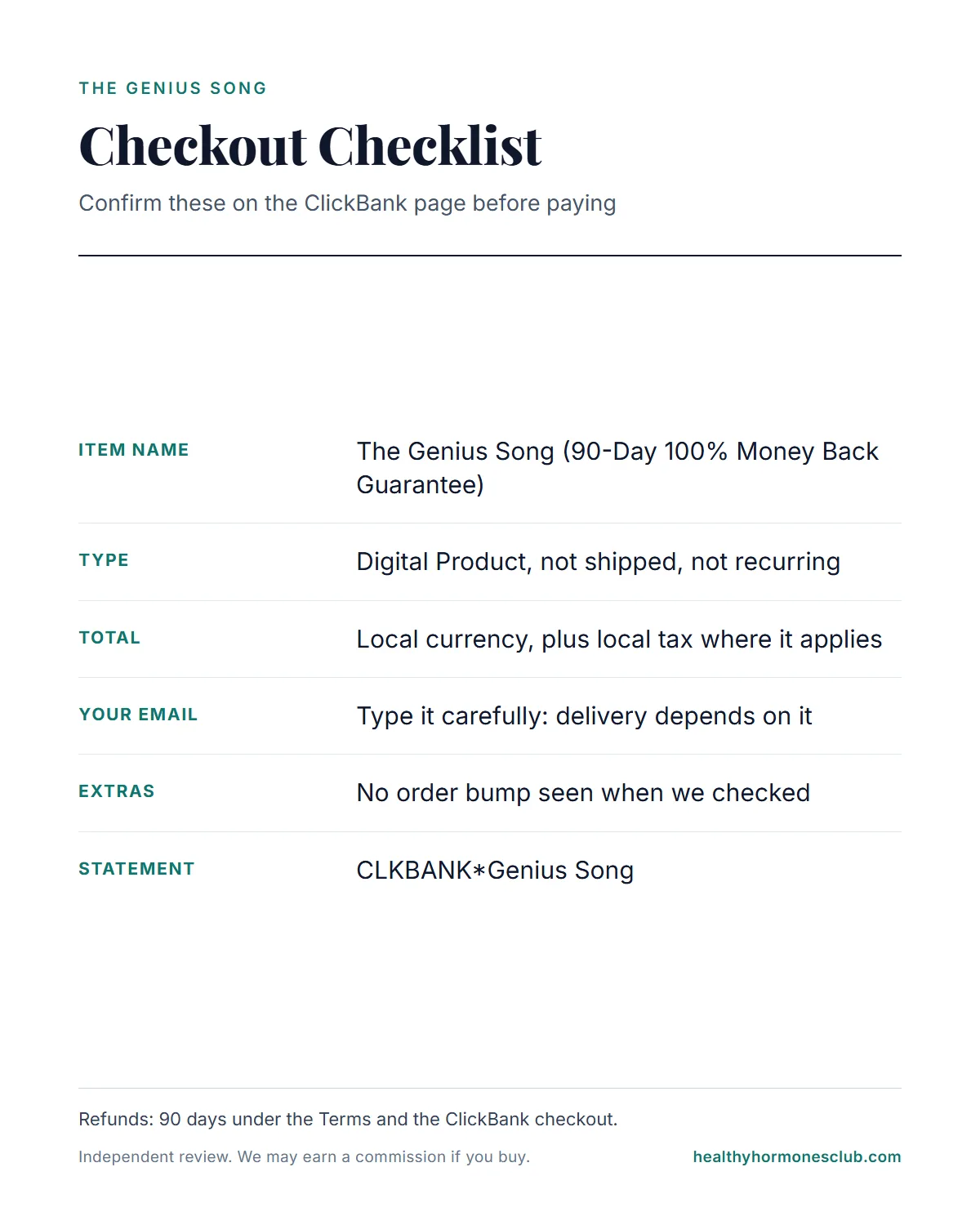
The order button takes you off the seller’s site to a ClickBank page at geniusbr.pay.clickbank.net. ClickBank is the retailer, which is why your receipt and statement come from ClickBank. On that page, check:
- The item name: “The Genius Song (90-Day 100% Money Back Guarantee).”
- The type: “Digital Product,” not shippable and not recurring.
- The total: shown in your local currency with local tax where it applies. From India, for example, we saw the total in rupees with tax added; in the US it is priced in dollars.
- Your email address: type it carefully. Delivery depends on it.
- Extras: we saw no pre-ticked add-on or order bump on this checkout.
Step 5: After Payment
The checkout says “Immediate access to digital products or services in your cart are available once payment is approved.” How access arrives is described two ways by the seller: the video and FAQ say the track is emailed and you download it to a phone or computer, while the text page’s order section describes a “Private Audio Portal” with login details by email. We could not confirm which buyers get.
You should also receive a ClickBank receipt, and your statement will read CLKBANK*Genius Song. The Terms say buyers are added to marketing email lists managed by HappyConsumerPublishing.com, which may include third-party offers; every email has an unsubscribe link. Whether ClickBank shows extra offers after payment, we could not check without buying, so read any further page carefully before clicking.
One Payment, 90 Days to Decide
Not recurring, per the checkout. The Terms and ClickBank both give 90 days to request a refund.
See the Offer on the Official Site
Refund help from ClickBank: 1-800-390-6035The Pressure Lines Along the Way
The site uses several urgency lines. Knowing them in advance makes them easier to ignore:
- “This thirty nine dollar price is not guaranteed beyond today."
- "Your order is set aside for you. But if you leave the page, it may be given away to someone else,” which makes little sense for a digital file.
- A “waiting list” if the product sells out.
- ”I will not be offering this online forever.”
These are sales tactics, not facts. Take your time, read the Terms in the footer, and only then decide. The Terms say refunds on digital products can be requested within 90 days, and the ClickBank checkout says the same. The site’s separate /TOS/refunds/ page, a 60-day bottle policy for a product called NeuroActivate, does not apply to a digital track; use ClickBank’s refund route.
The Terms also say the products are “provided for entertainment purposes only,” that testimonials may be acted out by avatars or actors or given by compensated people, and that results may not be typical. No published study tests this track. Our editorial score is 3.0 out of 5, our own rating rather than a customer average.
Related reading: our tour of every page on the official website, how to spot copycat Genius Song websites, and what happens with the download after purchase.
Our safety advice: listen at a comfortable volume, never while driving or operating machinery, and ask a doctor first if you have epilepsy, a history of seizures or hearing problems.
Frequently Asked Questions
How do I order from the Genius Song website?
Open the seller’s site, go to The Genius Song presentation on the /video/ page (or the /text/ version), use the order box, then pay on the ClickBank checkout at geniusbr.pay.clickbank.net. Check that the item reads The Genius Song before paying.
Why can’t I see an order button on the video page?
The page code sets the button to appear after 1,104 seconds, about 18 minutes into the 39-minute video. The /text/ page shows its order box without the wait.
Is the Genius Song website checkout a subscription?
No. The ClickBank checkout lists it as a digital product that is not recurring, for a one-time $39 (or the local equivalent plus tax).
Will the price go up if I wait?
The video says the $39 price is not guaranteed beyond today and that your order may be given away if you leave. These are sales tactics. We cannot predict price changes, but nothing in the Terms requires you to decide today.
What happens right after I pay?
The checkout says access is immediate once payment is approved. The seller describes delivery in two ways: an emailed track to download, and a Private Audio Portal with login details by email. You also get a ClickBank receipt.
How do I get a refund after ordering on the website?
The Terms allow refunds on digital products within 90 days, and the ClickBank checkout states the same. Request it through ClickBank at clkbank.com or 1-800-390-6035 using your receipt.
The Bottom Line
The Genius Song website works in five steps: a home page that features the related audio, a sales page on /video/ or /text/, an order box at $39, a ClickBank checkout that names the product and the 90-day window, and digital delivery after payment. The two checks that matter most are the item name on the checkout and the email address you type. Everything else, including the countdown-style pressure, can wait until you have read the Terms.
Start at Step 1
Open the seller’s site, find the /video/ or /text/ page, and confirm the checkout name before paying.
Go to the Official Website
Digital delivery, no shipping