
What is InstaDoodle? It is a cloud web app for making whiteboard-style doodle videos, the kind with simple drawn characters that appear, move and explain an idea while a voice narrates. You type a scene into a prompt box, DoodleAI draws the characters and elements, and you arrange them in an editor that runs in your browser. If an explainer video has been on your list for months because drawing and animating it sounds like a week of work, this tool is built for that gap. The seller’s official page lists three monthly plans, starting at $47 a month.
See What InstaDoodle Can Draw for You
Type a scene, let DoodleAI draw the characters, then add voiceover and music. Monthly plans start at $47, and the seller says you can cancel anytime.
Start Your First Doodle Video
Monthly billing · 60-day money-back guaranteeTable of Contents
How InstaDoodle Works
The workflow is simple, and it follows the same path from start to finish:
- Write the scene. Describe what the viewer should see, such as a teacher pointing at a diagram.
- Let DoodleAI draw it. The engine generates characters, elements and backgrounds from your prompt. Upload your own images if you already have artwork.
- Arrange and animate. Place each element in the drag-and-drop editor, then choose how it appears on screen.
- Add the voice and music. Record a narration, generate one, or upload your own audio, then add background music.
- Export the shape you need. Pick 16:9 for a website, 9:16 for a phone, 4:5 for a feed, or a square.
According to the seller, the whole process happens in the browser. There is no program to install, and the seller lists it as working on Mac, Windows and other devices with a modern browser. If you want a deeper walkthrough of the features, the InstaDoodle review covers each step in more detail, and the InstaDoodle hub links to every product page.
The Core Parts of the Editor
Your time in the app goes to four main things. The drag-and-drop editor handles placement and layering. Picture-to-doodle turns an image you upload into a sketch, so a photo can become part of the scene. The image editor with a background remover cleans up elements before they go on screen. And the animation tools control how each piece enters the frame.
- Six animation types: draw, wipe, slide, fade and pop-in, plus slide transitions between scenes.
- Eight drawing hands on Standard, with eight more on Pro, so the hand that draws can match your style.
- 14+ starter templates, which give you a layout to start from instead of a blank canvas.
- Four aspect ratios: 16:9, 9:16, 4:5 and square, so one project can serve several platforms.
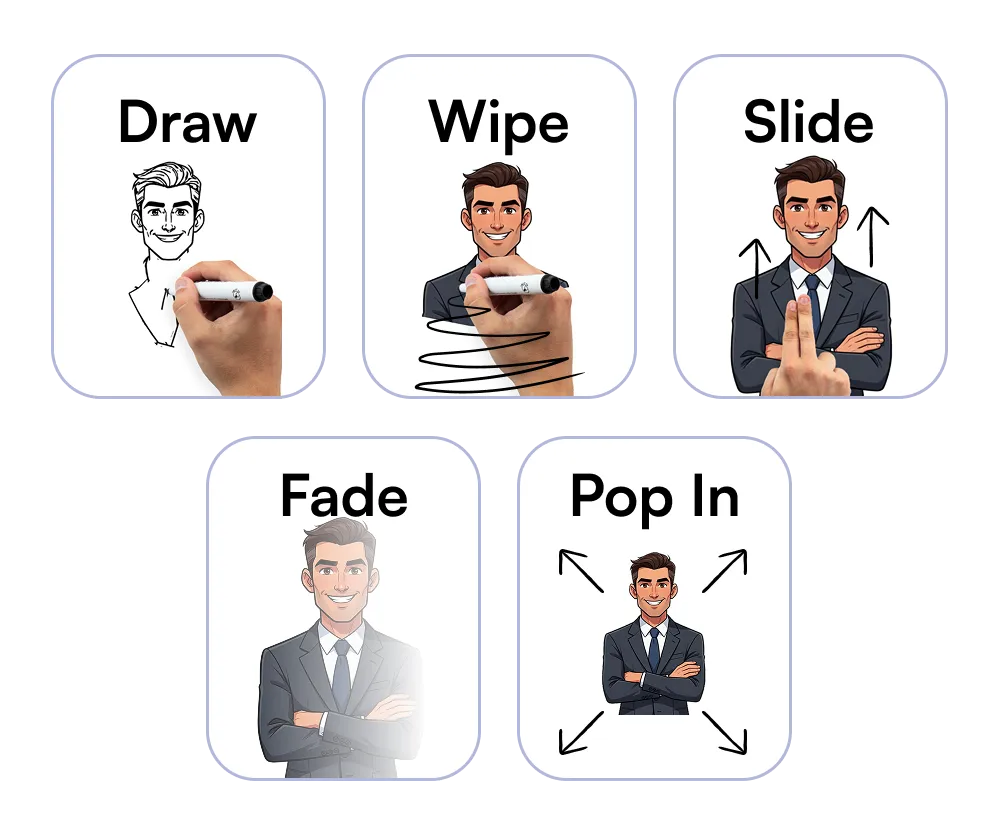
The animation tiles above show the entrance styles the seller lists. Each one gives a scene a different rhythm, which helps a lesson or a product explainer hold attention from the first second.
Build a Scene in One Sitting
Templates, DoodleAI and six animation types are ready to use from the Standard plan at $47 a month.
Open the Editor Plans
Cancel anytime, per the sellerWhat the Element Library Means
The seller lists 1,000+ built-in doodle elements on Standard. These are ready-made characters, objects and symbols you can drop into a scene. Pro adds 3,000+ PRO doodle elements and characters, and Agency adds InMotion, which brings 1,000+ animated elements and lets you upload your own video.
For a non-designer, the library matters because it cuts the drawing step. You still choose what the scene needs, but you do not have to build every object from scratch. DoodleAI can also create new characters from a prompt, so the library and the generator work together. The full plan-by-plan breakdown is on the what’s included page.

Who Uses a Tool Like This
The seller names training, onboarding, explainers, how-to clips and educational videos as the main uses. In practice, a tool like this fits people who make short videos on a regular schedule:
- Teachers and trainers who turn a lesson or a process into a short walk-through.
- Small-business owners who want an explainer for a product or a common customer question.
- Team leads who build onboarding clips for new staff.
- Content makers who publish explainers on a website, a video channel or a social feed.
The InstaDoodle price guide explains which plan fits each of these uses, and the InstaDoodle review goes through the strengths and the limits in plain language.
Make the Video You Have Been Planning
Describe the scene, let DoodleAI draw it, and add voiceover and music. Pick Standard, Pro or Agency on the order page.
Get Started With InstaDoodle
60-day money-back guaranteeWhat It Costs Each Month
InstaDoodle is sold as a monthly subscription. The seller’s official page shows three plans, and each one renews until you cancel.
| Plan | Price | What it adds |
|---|---|---|
| Standard | $47 a month | Editor, DoodleAI, 150 AI credits, 1080p HD export |
| Pro | $67 a month | PRO library, 2K and 4K export, commercial licence, music bonus |
| Agency | $127 a month | AI Wizard, InMotion, AI Voices in 30+ languages |
Pro includes one bonus that the seller lists under that plan: 20 Background Music Tracks. The commercial licence is listed on Pro and Agency, so check the Standard terms if you plan to use the output for clients. For the full price breakdown, see the InstaDoodle price page.
Compare the Monthly Plans
Standard from $47, Pro from $67 and Agency from $127 a month. The order page shows the plan and total before you pay.
See the Monthly Plans
Monthly billingBefore You Publish
AI output is a strong starting point, but it is still a draft. The seller’s terms say AI output may not qualify for exclusive copyright protection and should be reviewed before publication, so check every scene, label and voice line before a video goes live. Upload only the images, music and voices you have the right to use. According to the seller’s terms, your prompts, uploads and projects are processed by the seller and by third-party AI providers, so keep private material out of the editor.
The commercial licence is a plan detail. The seller lists it on Pro and Agency, so if the videos are for clients, confirm the licence on the plan you choose before you publish. The subscription renews each month until you cancel. The InstaDoodle what’s included page lists the rights and features for each plan side by side.
Frequently Asked Questions
What is InstaDoodle?
InstaDoodle is a cloud web app for making whiteboard-style doodle videos. You describe a scene, DoodleAI draws the characters and elements, and you add animation, voiceover and music in the browser.
Do I need to download anything?
No. The seller says there is nothing to download or install. You open the editor in a modern web browser.
How much does InstaDoodle cost?
The seller’s official page lists Standard at $47 a month, Pro at $67 a month and Agency at $127 a month, billed monthly. The order page shows the exact plan and total before you pay.
Is there a free version?
No. The seller says it does not offer free versions, so you pick a paid plan to start.
Which video shapes can I export?
The seller lists 16:9, 9:16, 4:5 and square exports. Standard exports in 1080p HD, and Pro adds 2K and 4K export.
Can I cancel my plan?
Yes. The seller says each plan can be cancelled at any time. Cancelling is a separate step from asking for a refund, so read the refund policy if you need one.